
Create Better Product Listings So Your Buyers & Google Can Find Them!
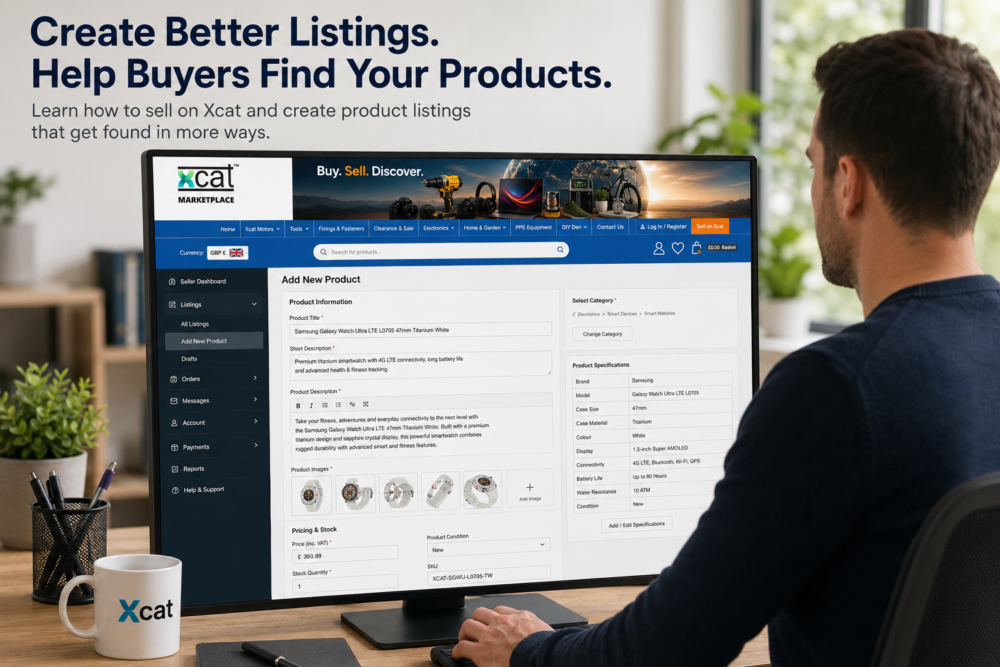
If you're learning how to sell on Xcat, one of the most important things you can do is create clear, accurate and useful product listings.
Creating a product listing is easy. Creating a good product listing that buyers can find, understand and trust takes a little more thought.
Xcat is designed around product discovery. We want sellers to have the best possible opportunity to get their products found — both by buyers browsing the Xcat Marketplace and by people searching through Google and other search engines.
The information you provide when creating your listing can make a real difference.
Start With a Clear Product Title
Your product title should clearly identify what you're selling without trying to include every specification or feature.
One of the most important considerations is the order of the words in the title.
As a general Xcat guideline, put the words that most clearly describe the product near the beginning, followed by the most useful identifying information.
Suggested Xcat Product Title Format
Core Product → Brand → Power / Size / Class → Key Differentiator
The brand can be added immediately after the core product description where it is useful to buyers.
For example:
Brushless Cordless Drill Driver – DeWalt – 18V – 2-Speed
The important hierarchy is:
What is it? → Who makes it? → What type / size / power is it? → What distinguishes it?
You don't have to use separators such as dashes if the title reads naturally without them.
For example:
Brushless Cordless Drill Driver DeWalt 18V 2-Speed
Bad and Better Product Title Example
Bad title:
18V 65Nm 2 Speed 13mm Chuck LED DeWalt Brushless Cordless Drill Driver with Variable Speed
Better title:
Brushless Cordless Drill Driver DeWalt 18V 2-Speed
The better title immediately establishes that the product is a Brushless Cordless Drill Driver, identifies the brand and then provides the most useful distinguishing information.
When creating your title:
- Identify the product first — use the clearest commonly understood name for the product.
- Add the brand where useful — normally after the core product description.
- Add useful identifying information — such as voltage, size, capacity, class or type where appropriate.
- Keep detailed specifications out of the title — that's what the Xcat Specifications table is for.
- Keep the title natural and readable — don't create long strings of keywords simply to try to attract search traffic.
Specifications such as torque, chuck capacity, battery capacity, no-load speed, weight and dimensions belong in the Xcat Specifications table rather than being packed into the title.
A good Xcat product title should allow a buyer — and a search engine — to understand what the product is within the first few words.
Write a Useful Product Description
A good description is an important part of learning how to sell on Xcat successfully.
Don't rely on a single sentence or simply repeat your product title.
Your description is your opportunity to explain what you're selling and why somebody might want it.
A useful product description should naturally answer questions such as:
- What is the product?
- What is it designed for?
- What are its main features?
- What materials is it made from?
- Which products or models is it compatible with?
- What is included?
- Are there important limitations buyers should know about?
You don't need to write an essay. A few useful paragraphs followed by clearly presented features can make a substantial difference.
Most importantly, write for the buyer first. A useful, natural description is better than a paragraph filled with repeated search terms.
Think About What Buyers Actually Search For
The words you use to describe your product matter.
A product can have several technically correct names, but buyers may predominantly search using one particular phrase.
This is where your main keyphrase becomes useful.
For example, a seller might describe a product as:
Cordless Power Drill
while buyers may be searching more frequently for:
cordless drill driver
Both may describe the product, but one could provide a much better opportunity to be discovered through search.
Check Whether People Search for Your Keyphrase
You don't have to simply guess which phrase buyers use.
One useful free tool is the Keyword Surfer browser extension, which can display estimated monthly search volumes alongside Google searches.
Try searching Google for several different ways of describing your product and compare their estimated search volumes.
For example:
- cordless power drill
- cordless drill
- cordless drill driver
If one relevant phrase receives significantly more searches than another, it may be a better candidate for your main product keyphrase.
However, search volume isn't everything.
The phrase must accurately describe the product you're selling. Don't choose a high-volume search phrase simply because it is popular if it doesn't correctly represent your product.
Once you've identified an appropriate keyphrase, include it naturally within your product description.
As a general guide, using your main keyphrase around 2–3 times in a reasonably sized product description can often be enough.
Don't repeatedly force the phrase into sentences simply for SEO.
The objective isn't keyword stuffing. It's making sure the terminology buyers actually use is naturally represented within your listing.
Complete Your Xcat Product Specifications
Product specifications are a particularly important part of how to sell on Xcat because Xcat uses structured product information to help buyers discover and compare products.
Depending on the category, specifications may include information such as:
- Manufacturer
- Model
- Dimensions
- Weight
- Material
- Colour
- Capacity
- Voltage
- Compatibility
- Warranty
- Country of manufacture
- Product-specific technical information
Complete as many relevant specifications as you accurately can.
Specifications aren't simply there to make your product page look more complete.
They help Xcat organise products and can be used by category filters, product discovery tools and future product-finding systems.
They also give buyers a consistent place to find important technical information without searching through a long product description.
Never guess a specification.
If you don't know something, it is better to leave an optional field blank than provide inaccurate information.
Understand Xcat Category Filters
One of the ways Xcat helps buyers find products is through category filters.
Category filters allow buyers to narrow down the products displayed within a category according to characteristics that matter to them.
When you complete your product specifications, some specification fields may also be used as category filters.
For example, someone browsing cordless drills might be able to filter products by:
- Brand
- Voltage
- Motor Type
- Chuck Size
- Product Type
Instead of searching through every cordless drill, the buyer can select the characteristics they need.
Cordless Drills → 18V → Brushless → 13mm Chuck
Xcat can then display products matching those requirements.
This creates another route through which buyers can discover your listing.
Why Category Filters Matter to Sellers
If an important specification is missing from your listing, your product may not appear when a buyer uses the corresponding filter.
For example, imagine you're selling an 18V brushless drill.
If you haven't completed the Voltage or Motor Type specification fields, Xcat may not be able to include your product when a buyer selects those filters.
Your product might therefore be suitable for that buyer but still miss an opportunity to be discovered.
This is why completing your specifications accurately is important.
Xcat doesn't use every specification as a filter. We select fields that are useful for helping buyers narrow down products within individual categories.
Different categories therefore have different filters.
Someone buying a laptop makes different purchasing decisions from someone buying a cordless drill, mobile phone or circular saw blade, so the filters available in those categories will also be different.
Specifications Can Create More Ways to Find Your Products
A completed specification isn't simply another piece of information displayed on your product page.
It can help Xcat create additional routes between buyers and products.
Category → Filter → Product
Google Search → Xcat Category → Product
Xcat Search → Product
Guide or Article → Product
Product Finder → Product
As Xcat develops, structured product information will become increasingly useful for connecting buyers with products that meet their particular requirements.
The more accurate information you provide, the more Xcat has to work with.
Choose the Correct Product Category
Choosing the correct category is another important part of how to sell on Xcat effectively.
Always select the category that most accurately describes your product.
Correct categorisation helps Xcat connect your listing with buyers through category pages, filters, search tools and other product-discovery features.
The category can also determine which Xcat Specification Template is available for your product.
That's important because different products require different information.
A mobile phone doesn't need the same specification fields as a cordless drill, and a circular saw blade doesn't need the same information as a laptop.
Don't place a product into an unrelated category simply to gain additional exposure.
Doing so can actually make it harder for the right buyer to find your product.
If the correct category isn't currently available, contact the Xcat Team rather than placing the product into an unrelated category.
Use Good Product Images
Clear images are an important part of a quality product listing.
Where possible:
- Use a clear main product image
- Make sure the product occupies a useful proportion of the image
- Add additional images showing different views
- Show important features and details
- Avoid unnecessarily distracting backgrounds
- Make sure the images accurately represent the product being sold
Your main image should make it immediately obvious what the buyer is looking at.
Additional images can then show important details, accessories, connections, controls, packaging or condition.
For used or refurbished products, photographs of the actual item being sold are particularly valuable because they allow buyers to assess its condition before purchasing.
Add Compatibility Information Where Relevant
Compatibility can be extremely important for products such as:
- Batteries
- Chargers
- Power tool accessories
- Electronic accessories
- Vehicle parts
- Replacement components
Don't simply say:
Fits many models.
Where possible, identify the actual models, systems or specifications with which the product is compatible.
Accurate compatibility information helps buyers determine whether they're purchasing the correct product and can reduce unnecessary returns.
Where Xcat provides dedicated compatibility or specification fields, complete those fields as well as explaining particularly important compatibility information within the description where appropriate.
Be Accurate About Product Condition
If you're selling a used, refurbished or open-box product, describe its condition accurately.
Mention significant marks, wear, missing accessories or other relevant information.
Creating a good listing isn't about making every product sound perfect.
It's about giving buyers enough accurate information to make an informed purchasing decision.
Clear condition information can also help reduce misunderstandings, returns and disputes.
Complete Shipping and Warranty Information
Where applicable, make sure your listing contains accurate shipping dimensions, weight and warranty information.
Shipping weight and dimensions are important because they can be used to determine how products can be delivered and which shipping services are appropriate.
Warranty information gives buyers a clear understanding of the protection being offered with the product.
These details will become increasingly important as Xcat continues developing its marketplace shipping, fulfilment and seller-management systems.
Providing accurate information now also helps ensure your listings are ready for future Xcat marketplace features.
Don't Copy Generic Manufacturer Descriptions Without Thinking
Manufacturer descriptions can provide useful technical information, but copying large amounts of generic text doesn't necessarily create a good marketplace listing.
Try to make your description specific to the actual product you're selling.
Useful, original information gives buyers a reason to read your listing and can help distinguish your product page from large numbers of near-identical pages elsewhere on the internet.
Manufacturer information can be a useful reference, but always check that everything you include actually applies to the particular product you're selling.
Pay Attention to Xcat Listing Recommendations
As part of selling on Xcat, you may occasionally receive recommendations from the Xcat Team about one of your listings.
A recommendation does not necessarily mean there's something wrong with your listing.
A listing may be perfectly acceptable for approval while still having opportunities for improvement.
We may identify opportunities relating to:
- Search visibility
- Product descriptions
- Keyphrase targeting
- Specifications
- Categorisation
- Buyer confidence
- Product discovery
Where practical, consider these recommendations when updating the listing or creating your next products.
As Xcat develops, we aim to provide sellers with increasingly useful guidance and tools to help improve listing quality and product discovery.
Better Listings Create More Opportunities to Be Found
Understanding how to sell on Xcat isn't simply about knowing how to upload a product.
Xcat is being built around product discovery.
A product may potentially be discovered through a category, specification filter, Xcat search, Google or another search engine, a guide, an article or one of Xcat's product-selection tools.
Detailed and accurate listings give Xcat more information to work with when creating these discovery routes.
That means spending a little extra time creating a good listing isn't simply about making the individual product page look better.
It can help Xcat connect your product with buyers throughout the marketplace.
A good listing doesn't just describe your product — it helps the right buyer find it.
The better the information you provide, the more opportunities Xcat has to help buyers find your products.