

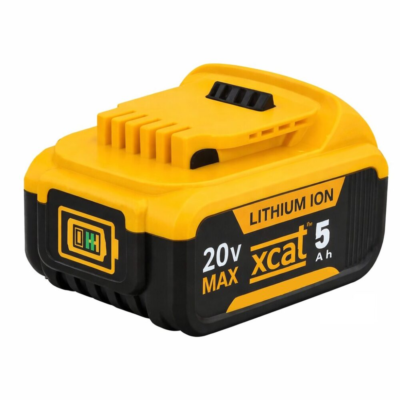


If your DeWalt battery is not charging, it does not always mean the pack needs replacing straight away. Many common faults can be diagnosed quickly, including temperature lockout, poor terminal contact, charger issues, or internal cell wear. Checking the likely cause first helps you avoid unnecessary replacement and makes it easier to decide when a new battery is genuinely needed.
DeWalt type slide batteries are widely used across professional and DIY power tools. Whether you are using a drill, impact driver, circular saw, or other cordless equipment, reliable battery performance is essential for productivity.
Most modern DeWalt tools use the 18V / 20V MAX XR lithium-ion battery platform. These slide-style batteries offer strong runtime, fast charging, and consistent power delivery. However, like all lithium-ion batteries, they will gradually degrade and can develop faults over time.
This guide explains how to diagnose common DeWalt battery problems, understand the likely cause, and decide when replacing the battery is the most practical option.
Understanding DeWalt 18V and 20V XR Batteries
Many users are confused by the difference between 18V and 20V MAX. In practice, they refer to the same lithium-ion platform.
- 20V MAX is the peak voltage immediately after charging
- 18V is the nominal operating voltage during use
This means most DeWalt XR tools using slide batteries are fully compatible across the same system.
Common battery models include:
- DCB180 – 3Ah
- DCB182 – 4Ah
- DCB184 – 5Ah
- DCB205 – 5Ah high capacity
- DCB206 – 6Ah extended runtime
Quick DeWalt Battery Diagnosis Guide
| Problem | Likely Cause | Quick Check |
|---|---|---|
| Battery not charging | Hot/cold pack delay, poor contact, or charger issue | Reseat battery, check charger power, clean terminals, allow battery to reach room temperature |
| Red light blinking | Normal charging operation | Leave battery on charger until light turns solid |
| Red + yellow light | Temperature delay (too hot or too cold) | Leave battery on charger until temperature stabilises |
| No charger lights | Faulty battery, charger issue, or no power | Check socket, try another battery or charger if available |
| Battery dies quickly | Worn or aging cells | Compare runtime with normal usage |
| Battery shows full but tool won’t run | Poor contact or internal protection cut-off | Clean contacts and test on another tool |
| Battery shows fully charged but has no power | Internal cell failure or voltage imbalance | Test under load – if tool won’t run or cuts out instantly, replacement is required |
| Battery overheats | Heavy load or failing internal cells | Stop use and monitor if overheating repeats |
| Battery completely dead | Deep discharge or internal failure | Try known working charger and compare with another battery |
This table helps identify why a DeWalt battery is not charging or performing poorly before deciding whether replacement is necessary.
Common DeWalt Battery Problems & Diagnosis
1. Battery Will Not Charge
If your DeWalt battery is not charging, first check the basics. Make sure the battery is fully seated in the charger, the charger has power, and the contacts are clean.
DeWalt chargers include temperature protection. If the battery is too hot or too cold, charging will pause automatically. This is normal behaviour and prevents damage to the cells.
If the battery still does not charge after returning to room temperature, the issue is more likely to be internal cell wear or a charger fault.
2. Charger Lights Explained
A blinking red light usually indicates normal charging. Once fully charged, the light becomes solid.
If a yellow light is also present, the charger is delaying charging due to temperature. This is not a fault.
If there are no lights when the battery is inserted, this may indicate a faulty battery, poor connection, or charger issue.
3. Battery Charges But Dies Quickly
This is one of the clearest signs of battery wear. Lithium-ion cells lose capacity over time, resulting in reduced runtime even after a full charge.
4. Battery Shows Fully Charged But Has No Power
If the charger indicates a full charge but the battery immediately cuts out under load or the tool will not run, this is a strong sign of internal cell failure or imbalance within the pack.
This happens when one or more cells can no longer deliver current under load, even though the overall voltage appears normal to the charger.
In this situation, repair is rarely cost-effective and replacement is typically required.
5. Battery Shows Full But Tool Will Not Run
This is commonly caused by poor electrical contact. Dirt, dust, or slight misalignment can interrupt power transfer between the battery and tool.
Clean the contacts and test the battery on another tool if possible. If the issue persists, internal battery protection or failure is likely.
6. Battery Overheats During Use
Some heat is normal under load, but excessive or repeated overheating suggests internal strain or failing cells.
7. Battery Completely Dead
If the battery shows no lights or response, it may be deeply discharged or internally damaged.
If there is still no response after testing with a known working charger, replacement is usually required.
When Diagnosis Means You Should Replace Your Battery
Once you have identified the fault, some battery problems clearly indicate that the pack has reached the end of its usable life. In these cases, replacement is usually more reliable and more cost-effective than repair.
Battery repair services typically charge around £10 just to diagnose the issue. If internal lithium cells are damaged, repair costs can range between £50 and £107.
In many cases, this makes repair poor value compared to buying a new battery with full performance and reliability.
- Repair costs can approach or exceed replacement cost
- No guarantee of long-term reliability
- Downtime while the battery is repaired
- Potential imbalance in replaced cells
- Limited or no warranty compared to new batteries
If your battery no longer holds charge, overheats during normal use, or repeatedly fails to charge, replacement is usually the most dependable solution.